How to keep a tracking domain from getting banned by Meta
You can't run Meta ads straight to onlyfans.com, so every campaign points at a bridge domain you own. That domain is the fragile part of the funnel. Meta fetches it on ad review, on domain verification, and whenever it refreshes the link preview, and if what it sees looks adult, the domain gets struck. This is a working guide to keeping those domains alive: how a strike happens, how to catch it early, and what to do once one goes down.
Why Meta bans a tracking domain
Meta judges the page, not your intentions. Its crawler pulls the HTML and, more to the point, the og:image — the share screenshot it runs through OCR and a nudity model. Most of the time the brand-free text passes fine and the image is what sinks you: a suggestive hero shot baked into the preview, or the live landing page served to Meta's scanners. Control what the crawler sees and the strike never fires.
What one strike sets off
A strike rarely stops at the domain. It tends to climb.
What one strike sets off
- 01Domain struckthe flagged page
- 02Ads rejectedanything pointing at that URL
- 03Tracking blockedevents stop counting
- 04App blockedevery pixel it feeds goes dark
First the ads pointing at that URL start getting rejected. Then the events from it stop counting, so your reporting quietly goes hollow while your dashboard still says everything is fine. The worst case reaches the Meta app feeding your dataset: it gets flagged "API access blocked", every system-user token minted from it dies, and every pixel it feeds goes dark at once, across creators rather than just this one. That last jump is the reason a single adult page is worth taking seriously.
How to tell if a domain is restricted
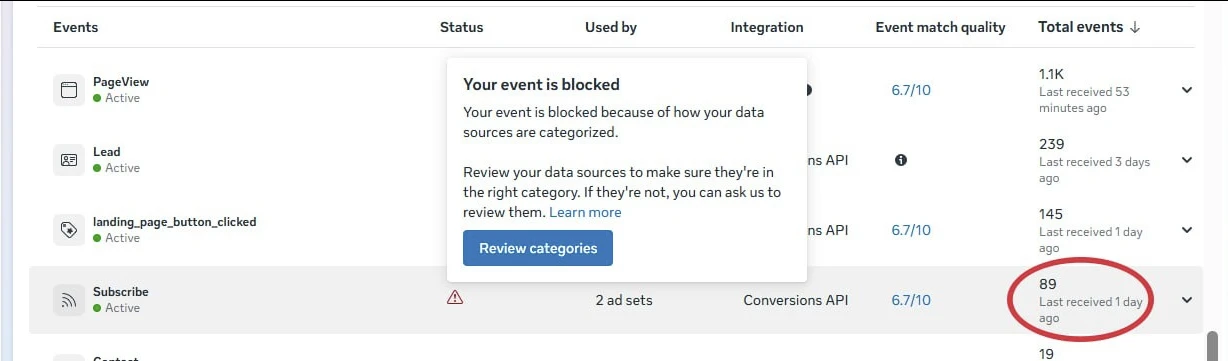
Your own dashboard is the wrong place to look. "Sent 100%" only means the event left your server, not that Meta kept it. Two Meta screens give you the real answer.
The first is Events Manager → Diagnostics, which flags a domain that's been cut off from sending data in plain language.
The second is the Sharing Debugger at developers.facebook.com/tools/debug. Paste the URL and it shows how Meta actually fetches it: the HTTP status it gets back, the preview and image it has cached, and a Scrape Again button to recheck after a fix. A 403 there usually means your cloak is doing its job and turning Meta's crawler away, which is what you want.
How to prevent it
Prevention comes down to two things: controlling what Meta sees, and getting the plumbing right so a clean domain can actually send data.
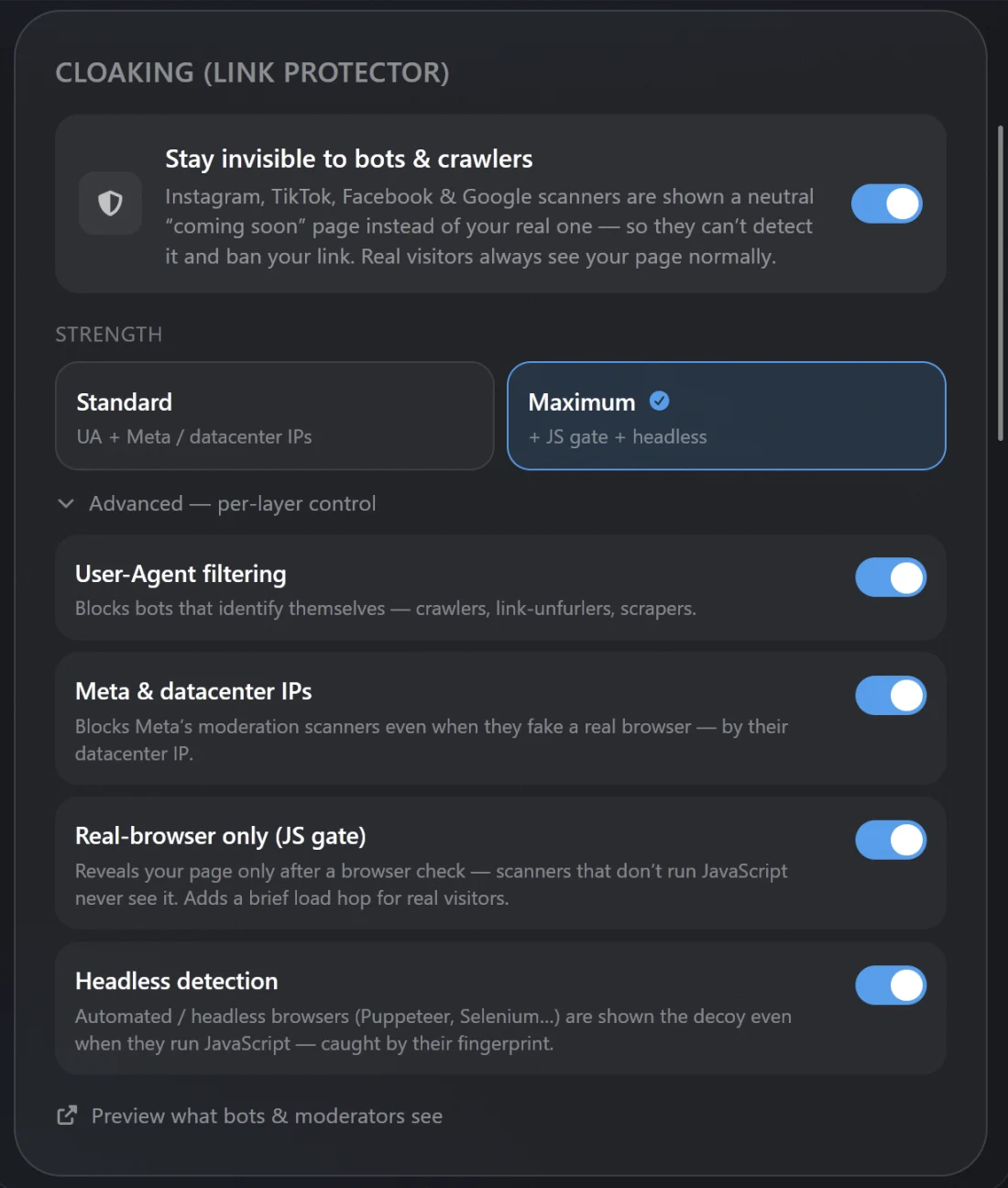
- Cloak the landing pageShow datacenter and Meta scanner IPs a neutral page, and the real one only to genuine mobile visitors. It matches on IP and network, not the user-agent, so Meta's classifier never loads the adult page or its share image.
- Verify by DNS-TXT, not the HTML tag Built by default on OnlyFansPixelOnce you cloak, Meta's verification crawler gets turned away too, so the file and meta-tag methods keep failing. Add a TXT record (
facebook-domain-verification=<code>) and switch the Business Manager method to DNS instead. On OnlyFansPixel this is set up for you automatically. - Keep the page and its share image cleanSFW-first landing page, no OnlyFans logo in the
og:image, and suppress the share screenshot on the bridge domain so there's nothing to scan. - One fresh domain per Business ManagerA domain verifies in a single BM. Give each BM its own, ideally on its own IP, so a neighbour's strike can't drag yours down.
- Add the domain to the pixel's allow listIn Events Manager → Traffic permissions, add the tracking domain. A verified domain that isn't on this list still has its events dropped.
When a domain does get banned
A domain ban isn't permanent. It's closer to a 60-day timeout: sit it out and the domain comes back and can write to the pixel again. So treat your domains as a rotation, not as disposables.
Move ads and the landing page onto a fresh, rested domain right away so acquisition keeps running. Leave the struck one alone for the 60 days. Spending on it or re-verifying in a panic won't speed anything up. If you've genuinely fixed the cause behind the strike, you can submit a review from Events Manager or the Account Quality page to clear it sooner, but only once the fix is real.
Watch: the domain-verification problem
If you want the background in video form, this walkthrough covers the Facebook domain-verification issue and how it's usually fixed.
A short primer on the Facebook domain-verification problem (LYFE Marketing).
Frequently asked questions
Why did Facebook ban my OnlyFans landing-page domain?
Meta fetched the page or its share-image screenshot, and its nudity model flagged the content. It fetches on ad review, on domain verification, and when it caches the link preview. The usual culprit is a suggestive hero photo baked into the og:image, not the text on the page.
Is a Meta domain ban permanent?
No. It behaves like a 60-day timeout. After the cooldown the domain is unblocked and can send to the pixel again. You can request a review to clear it sooner, but only after you've fixed what caused the strike.
How do I check whether a domain is restricted?
Open Events Manager → Diagnostics, which tells you directly if a domain has been cut off from sending data. Cross-check it in the Sharing Debugger (developers.facebook.com/tools/debug) to see the HTTP status and cached preview Meta holds for the URL. Your own "events sent" number isn't Meta's acceptance, so don't rely on it.
What is cloaking, and do I need it?
Cloaking shows Meta's scanners a clean page, matched by IP and network, while real visitors get the real page. It's the main defense against a content strike. Once you turn it on, verify the domain by DNS-TXT, because the cloak also turns away Meta's verification crawler.
My ads to that URL keep getting rejected. Is it the domain?
Probably. A struck domain has its ads rejected and its events blocked, and it can climb to the app feeding the dataset. Check Diagnostics for the domain first. If the whole pixel went quiet at once, look at the dataset or the app rather than the single domain.